
꒰ koucal 2.0 ◞ major feature update ꒱
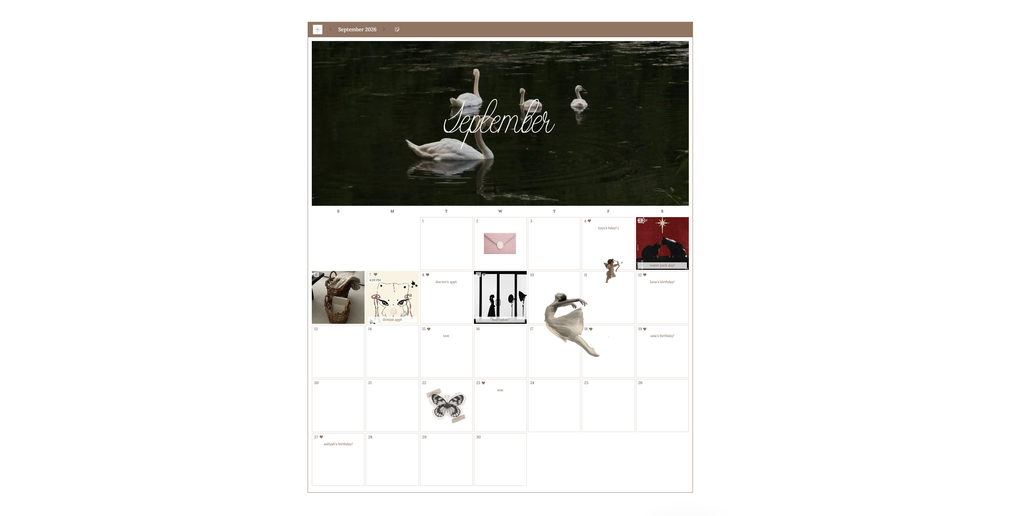
i’ve been diligently working on giving koucal a much bigger personality. with the help of my roommate ( thank you gray! ), i was able to add a series of amazing new features to make koucal the exact kind of calendar widget i would want and happily use.
calendar styles
i love a good bujo calendar with stickers and washi tape, and i love a good flip calendar with an image on top, days on the bottom. so, i kept the original, but added scrapbook and flip style in the settings. with these styles comes my favorite features to date!
cover photo ( flip only )
- banner above the calendar per month. you can change the picture for each month! ( i like to theme my calendars per month! )
- zoom ranging from 100-200%
- reposition via drag or fixed position arrows
- syncs across all devices
day block photos ( scrapbook + flip )
- add a photo to the block of any date. it fills the block behind the day #.
- add, change, or remove from an individual day at any time.
stickers ( scrapbook + flip )
- add selected image stickers anywhere on the calendar space.
- drag to move, drag corners to resize ( ranges 10-300% ), and drag to rotate.
- layer stickers! ( newest is always on top )
month title ( scrapbook + flip )
- 34 new title fonts ( separate from the app fonts )
- size slider! ( ranges 14-96 px )
- hex color selector for the title
- 13 positions ( every edge surrounding the calendar or centered on the flip mode banner photo )
event times ( all styles )
- add a time to your note/event per day.
- displays 12-hour with am/pm, and 24-hour time in jp or kr language setting.
settings additions ( all styles )
- weekday format : initial ( m/t/w ) or short ( mon/tue/wed )
- day size : new ‘extra large‘ option!
- text color : day numbers and note colors have been split from the general accent/border color
- label color : weekday headers
- color pickers all grouped, moved to the top of the settings panel.
miscellaneous changes
- banner photos now save up to 2400 x 1600 instead of 1050 x 700. this is to give you higher quality display while not sacrificing the limitations of size for syncing.
- images that are too large will automatically resize to meet limits.
have fun, koucal havers! c: